
How to Understand Laptop Overheating and What Actually Fixes It
Laptop overheating happens when internal heat builds up faster than the cooling system can remove it. This article explains the real technical causes—such as airflow blockage, thermal paste failure, and fan wear—and how these issues are effectively resolved.

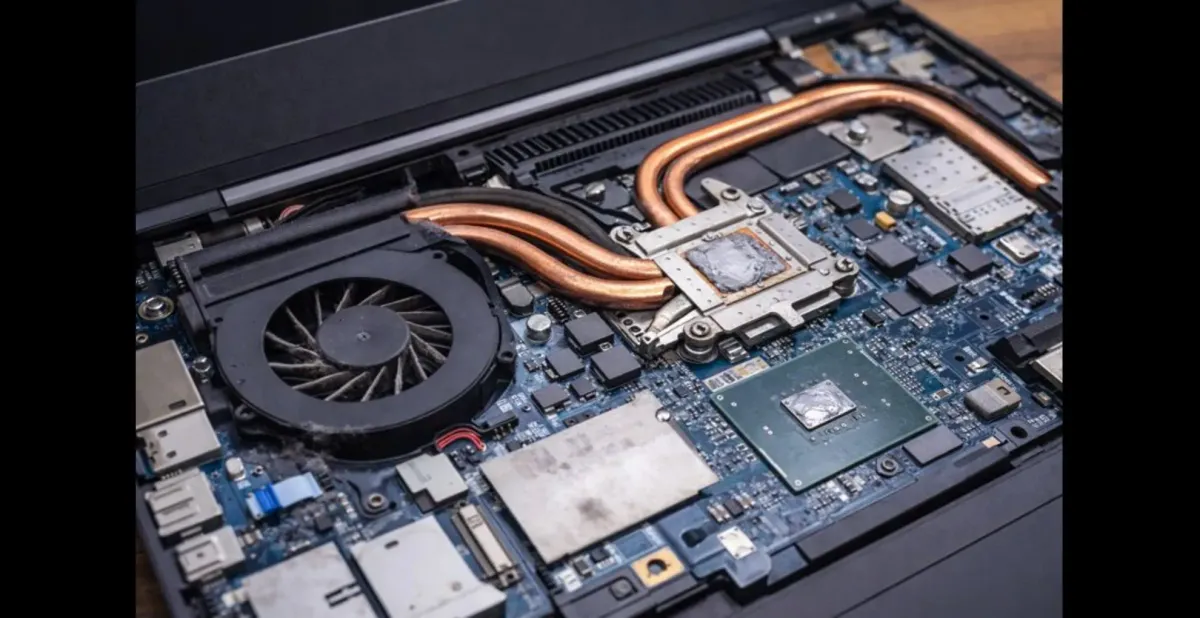
The real question behind this
A laptop becomes hot, noisy, or suddenly slow, even during normal work.
Users often wonder whether this is caused by software, heavy usage, or a hidden fault.
The confusion comes from not seeing what happens inside the device.
This topic exists to explain where the heat comes from and why it stops escaping.
What this means
Laptop overheating occurs when heat generated by internal processors builds up faster than the cooling system can remove it.
Every laptop relies on a chain of heat movement: processors generate heat, thermal materials transfer it, fans move air, and vents release it outside. When any part of this chain weakens, temperature rises even if the laptop still appears to function normally. This definition stands alone because overheating is a system imbalance, not a single broken part.

$750 Amazon Gift Card
Some users qualify for a $750 Amazon gift card. You can check if you qualify.
Why this matters today
Modern laptops are thinner and more powerful than earlier designs. CPUs and GPUs now boost performance dynamically, creating rapid heat spikes. At the same time, compact cooling systems leave little tolerance for dust, aging materials, or airflow blockage.
What has changed is thermal density and power bursts. What remains stable is the rule that excess heat must exit the device. When it does not, performance throttling and hardware stress follow.
How this works in practice
Heat generation from processors
Modern processors increase clock speed automatically under load, which sharply raises heat output.
Technical facts:
- Turbo boost modes increase power draw significantly
- Heat output rises faster than fans can immediately respond
Effective solution:
Limiting sustained boost through power settings or workload management reduces sudden thermal spikes.
Takeaway: Overheating often begins during short performance bursts, not continuous use.
Thermal paste and heat transfer failure
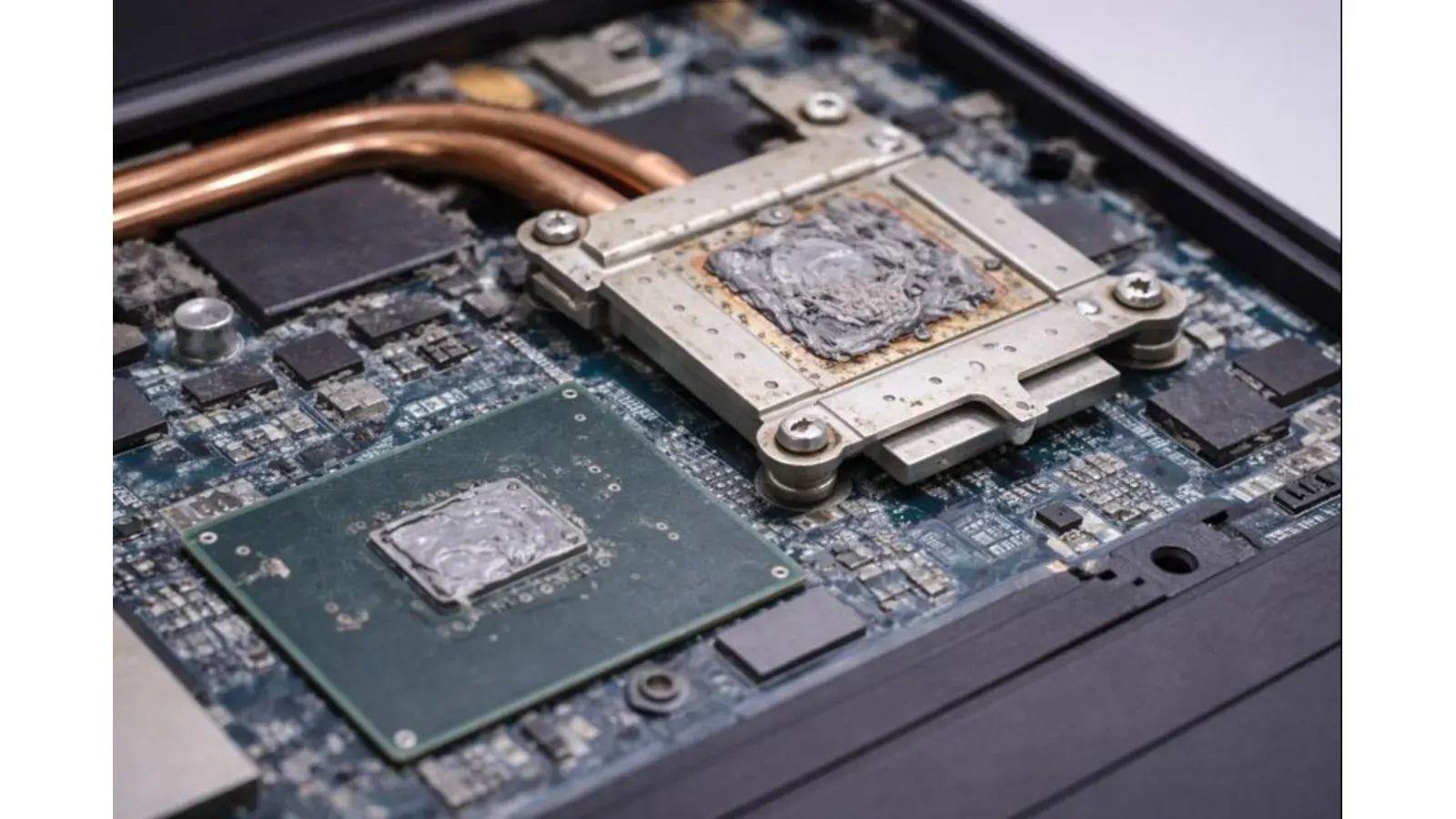
Thermal paste fills microscopic gaps between the processor and heat sink. Over time, it dries out and loses conductivity.
Technical facts:
- Dried paste increases thermal resistance
- Heat remains concentrated at the processor die
Effective solution:
Replacing thermal paste restores efficient heat transfer.
Takeaway: A working fan cannot compensate for poor heat transfer.
Dust buildup and airflow restriction
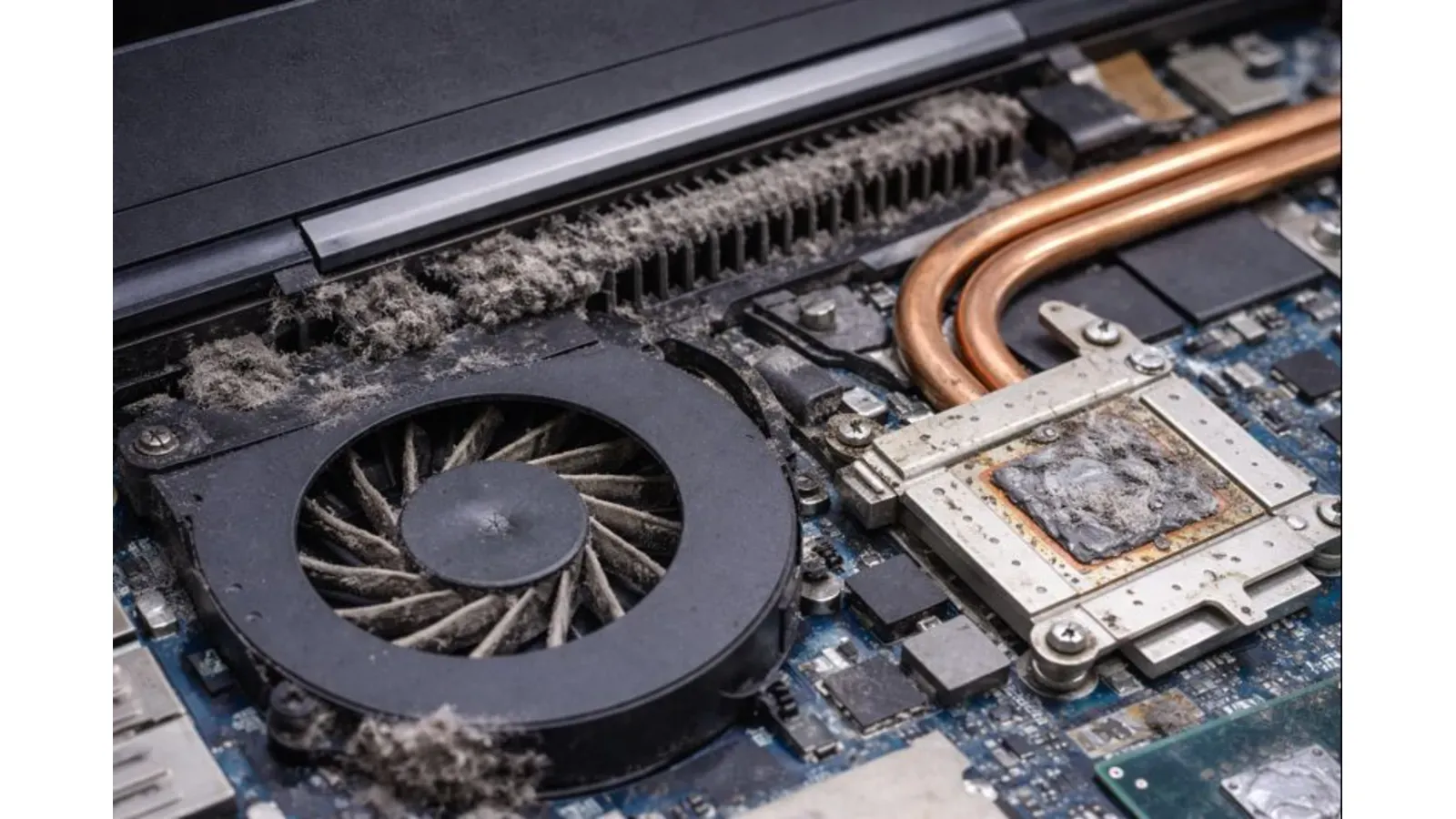
Dust collects inside fans and vents, reducing air volume and redirecting hot air back into the system.
Technical facts:
- Reduced airflow lowers heat sink efficiency
- Internal dust is not removed by surface cleaning
Effective solution:
Internal cleaning restores proper airflow and heat removal.
Takeaway: Airflow blockage is one of the most common overheating causes.
Fan wear or control issues
Fans may spin but fail to reach required speeds due to bearing wear or faulty control signals.
Technical facts:
- Fan speed directly affects cooling capacity
- Noise does not equal airflow
Effective solution:
Fan replacement or control calibration restores cooling performance.
Takeaway: A loud fan is not always an effective fan.
Heat pipe or vapor chamber degradation
Heat pipes move heat away from processors. Internal fluid degradation reduces their ability to transport heat.
Effective solution:
In severe cases, heat sink or pipe replacement is required.
Takeaway: Some overheating issues are structural, not maintenance-related.
Real-world scenarios or examples
A laptop overheats only during video calls. Inspection shows short CPU boost spikes combined with dust-restricted airflow. Cleaning resolves the issue.
Another laptop runs hot even at idle. Replacing hardened thermal paste restores normal temperatures. These examples show overheating as a cooling-chain failure, not user misuse.
Quick Understanding Summary
Laptop overheating happens when internal heat generation exceeds the cooling system’s ability to remove it. Common causes include degraded thermal paste, restricted airflow from dust, fan performance loss, or heat pipe failure. Modern laptops operate close to thermal limits, so small cooling inefficiencies can quickly lead to overheating, throttling, and reduced hardware lifespan.
Common mistakes to avoid
Many users assume overheating is caused only by heavy software use. Others rely on external cooling pads while ignoring internal airflow or thermal paste condition. Software fixes alone cannot resolve physical heat transfer failures.
Comparisons / alternatives
| Situation | What it usually indicates |
|---|---|
| Hot chassis, loud fan | Airflow restriction or high thermal load |
| Sudden slowdown under load | Thermal throttling |
| Overheating at idle | Thermal paste or heat pipe issue |
| Unexpected shutdowns | Critical temperature protection |
These comparisons reflect real diagnostic outcomes.
User real review / expert perspective
Rahul Mehta, remote worker: “My laptop slowed down constantly. Cleaning helped a bit, but replacing thermal paste fixed the overheating completely.”
i don't have an ac, my hp laptop shut down three times today without warning due to cpu overheat (temp above 90°C)
— whynesspower (@whynesspower) May 23, 2024
its just too hot to work in north india (i'm here in 📍bhopal, with over 43°) pic.twitter.com/AP1Jd8KfsX
Expert – Hardware technician Sanjay Rao: “Most overheating cases are caused by poor heat transfer, not faulty software.”
Did you know ?
— Val Gadgets (@Val_Gadget) December 25, 2025
5 Things That Spoil Laptops Fast 💻
1. Overheating – Blocked vents = heat damage.
2. Power surges – Always use a surge protector.
3. Liquid spills – One drop can fry the board.
4. Rough handling – Drops kill screens & drives.
5. Fake chargers – They ruin… pic.twitter.com/rKGC1mBBDf
Future trends / predictions
Future laptops will increasingly use vapor chambers, AI-controlled fan curves, and power-efficient processors. However, thinner designs will continue to limit cooling headroom. Preventive maintenance and thermal-aware usage will remain essential.
Final answer or solution
Laptop overheating is best solved by identifying where heat transfer fails—processor interface, airflow path, fan output, or heat transport components. Addressing these physical causes with cleaning, repasting, or component replacement provides lasting results, while software tweaks only manage symptoms.

$500 Walmart Gift Card
Not everyone qualifies for this $500 Walmart gift card. Checking only takes a moment. You can check if you’re eligible.
 Shivam Choudhary
FAQs
Can a laptop overheat during light use?
Yes, if thermal paste or airflow is compromised.
Do cooling pads solve overheating?
They help airflow but cannot fix internal heat transfer failures.
Is thermal throttling harmful?
It protects hardware but repeated overheating shortens lifespan.
How often should thermal paste be replaced?
Typically every 2–3 years, depending on usage and design.
Conclusion
Laptop overheating is a measurable thermal imbalance, not a mystery. When heat cannot exit the system efficiently, performance and reliability suffer. Understanding how heat moves inside a laptop leads to solutions that actually work.



