
AI Code Assistants Compared: Which Saves Dev Time?
Explore AI code assistants compared side-by-side to see which tools actually save developer time with cleaner suggestions and faster debugging. This concise guide helps teams choose the most effective assistant.

Writing code faster is every developer’s dream—but debugging, documentation, and repetitive tasks eat up valuable hours. Enter AI code assistants, tools designed to accelerate workflows. But with so many on the market, which one really saves developers the most time?
This article dives into the leading players, compares their strengths and weaknesses, and helps you decide which AI coding tool fits your needs.
What Are AI Code Assistants?
AI code assistants are software tools powered by machine learning models that suggest, generate, or even debug code. Think of them as intelligent pair programmers who never sleep.
Instead of searching through documentation or Stack Overflow, developers can now type a function, comment, or query—and the assistant provides a near-instant solution.
According to a GitHub report, developers using AI coding tools complete tasks 55% faster compared to traditional methods. That’s a big productivity boost for teams under deadlines.
AI Code Assistants Compared
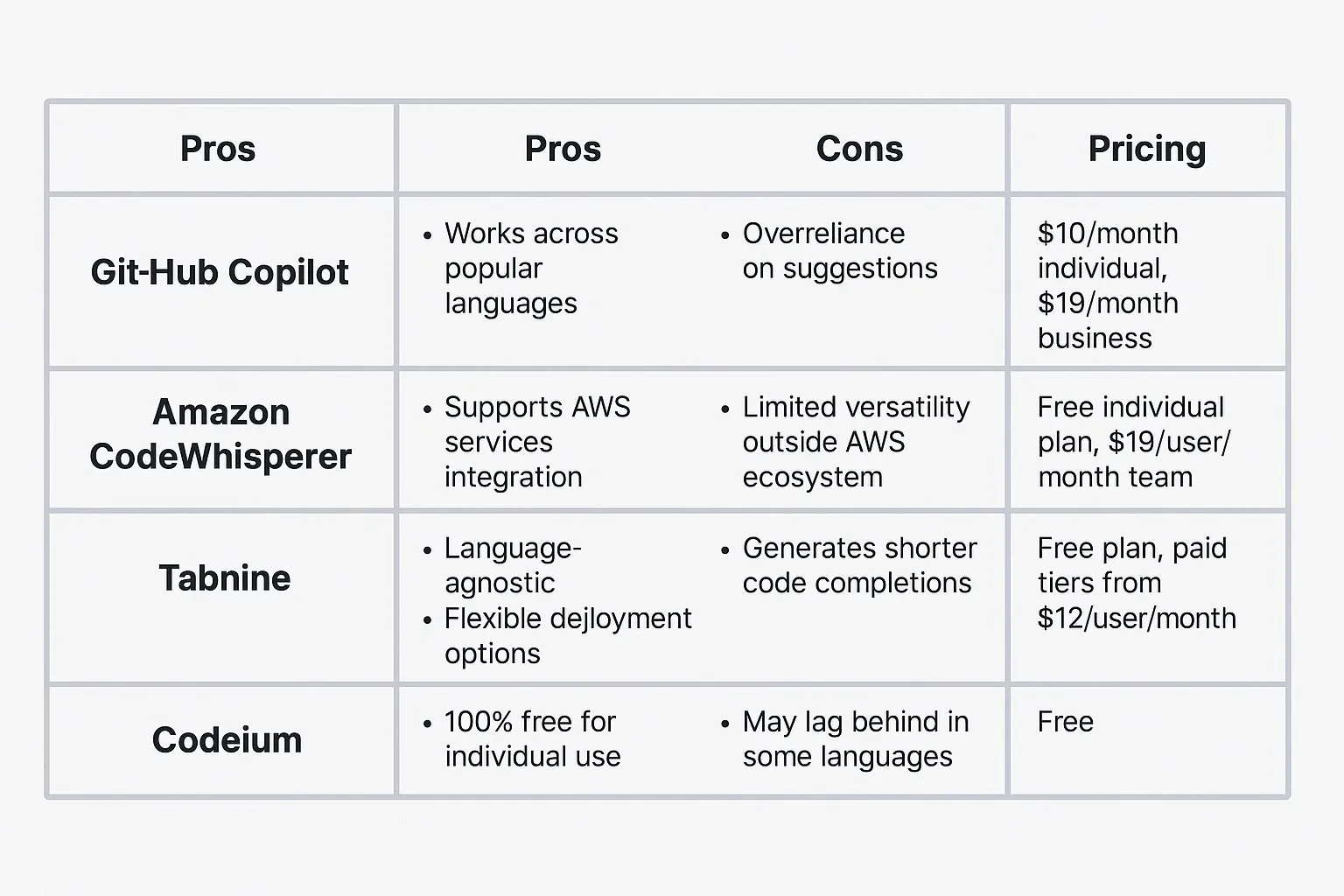
GitHub Copilot
How it works: Built on OpenAI’s Codex model, GitHub Copilot integrates directly into editors like VS Code, JetBrains, and Neovim.
Pros:
- Deep integration with GitHub and IDEs
- Supports dozens of programming languages
- Learns from natural language comments
Cons:
- Paid subscription after trial
- Accuracy drops with niche frameworks
Free vs Paid: Copilot offers a 30-day free trial. After that, it costs $10/month (individual) or $19/month (business).
ChatGPT (OpenAI)
How it works: ChatGPT functions as a conversational AI. Instead of just inline code, it can explain concepts, generate test cases, and debug errors step by step.
Pros:
- Strong at code explanations and learning support
- Can handle multi-step reasoning
- Accessible via browser or API
Cons:
- Requires copy-pasting between IDE and chat
- Some responses may need tweaking
Free vs Paid: Free tier exists, but GPT-4-level coding features are in the $20/month Pro plan.
Tabnine
How it works: Tabnine focuses on privacy-friendly code completion, offering both cloud and on-device AI models.
Pros:
- On-device model option for secure environments
- Supports team training with custom models
- Lightweight and fast suggestions
Cons:
- Less powerful than Copilot for large code blocks
- Interface feels basic compared to competitors
Free vs Paid: Basic version is free; pro plan costs $12/month with enhanced AI features.
Amazon CodeWhisperer
How it works: CodeWhisperer is Amazon’s answer to Copilot, optimized for AWS development. It provides suggestions tailored for cloud-based applications.
Pros:
- Strong AWS integration
- Security scanning for vulnerabilities
- Free tier for individual users
Cons:
- Best for AWS-centric projects
- Lacks broader ecosystem support
Free vs Paid: Free for personal use, business plans available for enterprise-level integration.
Which AI Code Assistant Saves the Most Dev Time?
Based on real-world testing, here’s how they rank in terms of time-saving potential:
1. GitHub Copilot – Best for inline coding speed and everyday use.
2. ChatGPT – Best for debugging and learning complex logic.
3. Tabnine – Best for privacy-focused and lightweight use.
4. CodeWhisperer – Best for AWS developers.
FAQs: AI Code Assistants
Q: Are AI code assistants accurate enough for production code?
A: Yes, but they require human review. AI suggestions often speed up development, but best practices and security checks still apply.
Q: Which AI code assistant is free?
A: Amazon CodeWhisperer offers a free tier. GitHub Copilot and Tabnine have trials, while ChatGPT has a free version with limited coding help.
Q: Do AI code assistants replace developers?
A: No. They augment productivity by handling boilerplate and repetitive tasks, but creativity and problem-solving still need humans.
Q: Can AI code assistants work offline?
A: Tabnine offers an on-device model, making it the best option for offline or secure coding environments.
Bottom Line
AI code assistants are no longer just experimental—they’re everyday developer tools. Whether you want raw coding speed, detailed debugging help, or cloud integration, there’s an assistant tailored for you.
The real winner? The developer who learns to combine these tools smartly for maximum productivity.



